WhatsApp Payment Reminders
A daily list of overdue and soon-due invoices. One click opens WhatsApp with the reminder typed out. You press Send.
Coming soon to the Zoho Marketplace
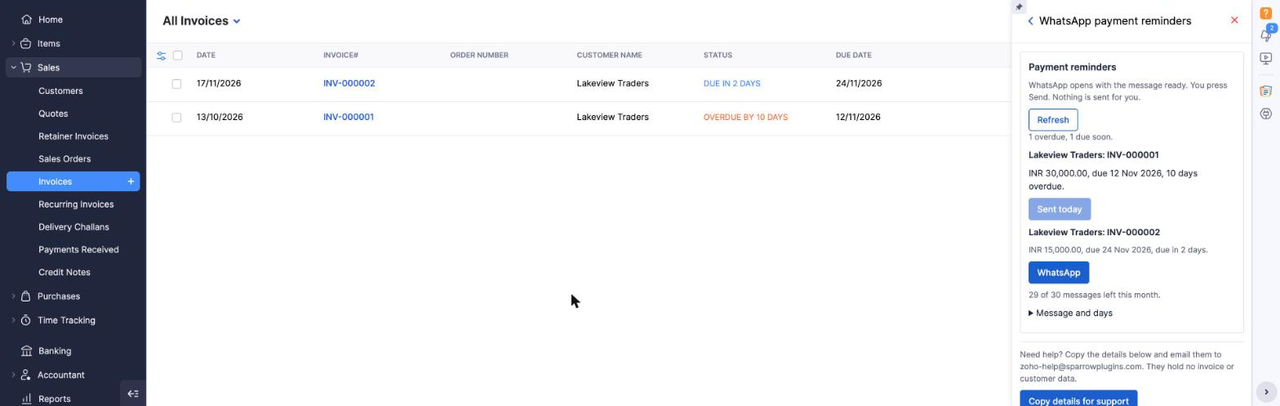
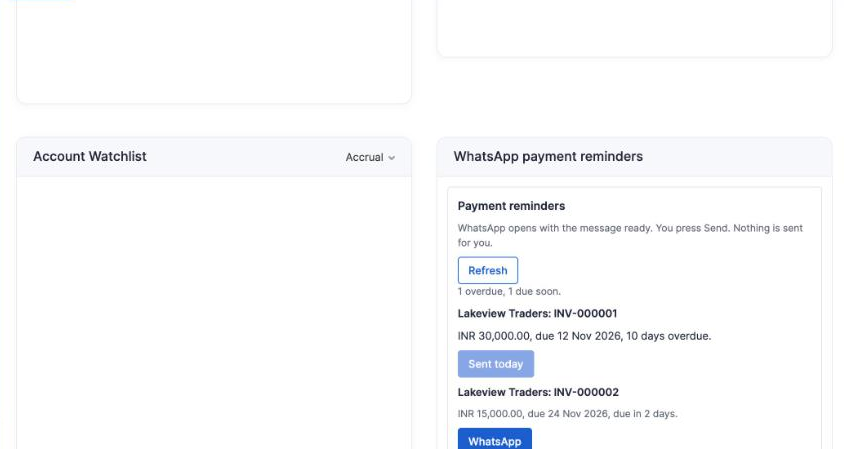
This extension lists invoices that are overdue or due in the next few days, on your dashboard and beside the invoice list. Click WhatsApp on a row and WhatsApp (app or web) opens on your own number, in a chat with the customer, with your reminder typed. You press Send.
Zoho Books has its own WhatsApp reminders. Those need a WhatsApp Business account, a verified Meta Business Manager, approved templates and paid credits. This extension needs none of that. It does not use the WhatsApp Business API and sends nothing by itself.
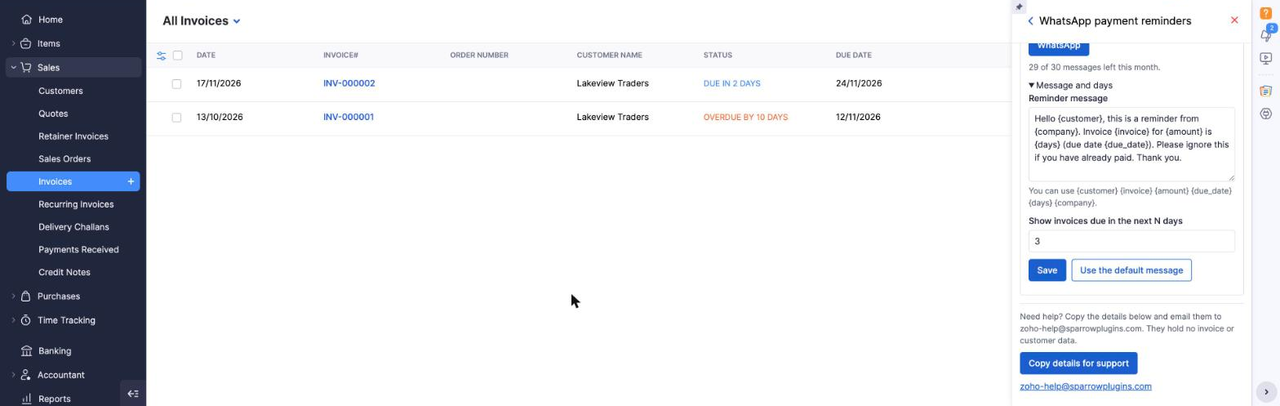
You write the message once, with placeholders. The number comes from the customer's mobile or phone field. Indian numbers get +91, and a landline is flagged so you know which customer to fix. A sent mark stops the same reminder going twice in a day.
Not affiliated with Zoho Corporation. WhatsApp is a trademark of its owner, who did not make or approve this extension.
What it does
- Overdue invoices and invoices due soon (you set how many days)
- One click opens WhatsApp with the number and your message
- Your own message with {customer} {invoice} {amount} {due_date} {days} {company}
- Indian numbers get +91; bad numbers are flagged with the reason
- A sent mark per invoice, with the last reminder date
Set it up
- Install the extension from the Zoho Marketplace.
- When Books asks, authorise the connection named sparrowbooks with your Zoho Books login. It lets the extension read unpaid invoices and customer numbers, and keep your message in a hidden global field.
- Open the dashboard, or Sales > Invoices and the panel on the right side bar.
- Open "Message and days" to change the text and how many days ahead to show. Click Save.
- Click WhatsApp on a row and press Send.
- If a row has no WhatsApp number, add a mobile number to that customer and click Refresh.
Plans and limits
Lite: 30 messages a month per organisation. A message counts when WhatsApp opens for it. Pro: unlimited, USD 6 a month after a 15-day free trial. Up to 200 unpaid invoices at a time. Zoho Books Premium plan or higher is needed for widgets. Built for the India edition of Zoho Books.
Privacy
The extension reads unpaid invoices and the customer's mobile and phone numbers inside Zoho Books. It sends nothing. When you click WhatsApp, your browser opens wa.me with the number and message, and you choose whether to send it. Your message, sent marks, a monthly count and a short error log stay in a hidden global field in your organisation.
Support
Email zoho-help@sparrowplugins.com. "Copy details for support" in the panel gives text to paste in; it holds no customer data. Maker: Sparrow Plugins, Udaipur, India.