PIN Code Address Fill
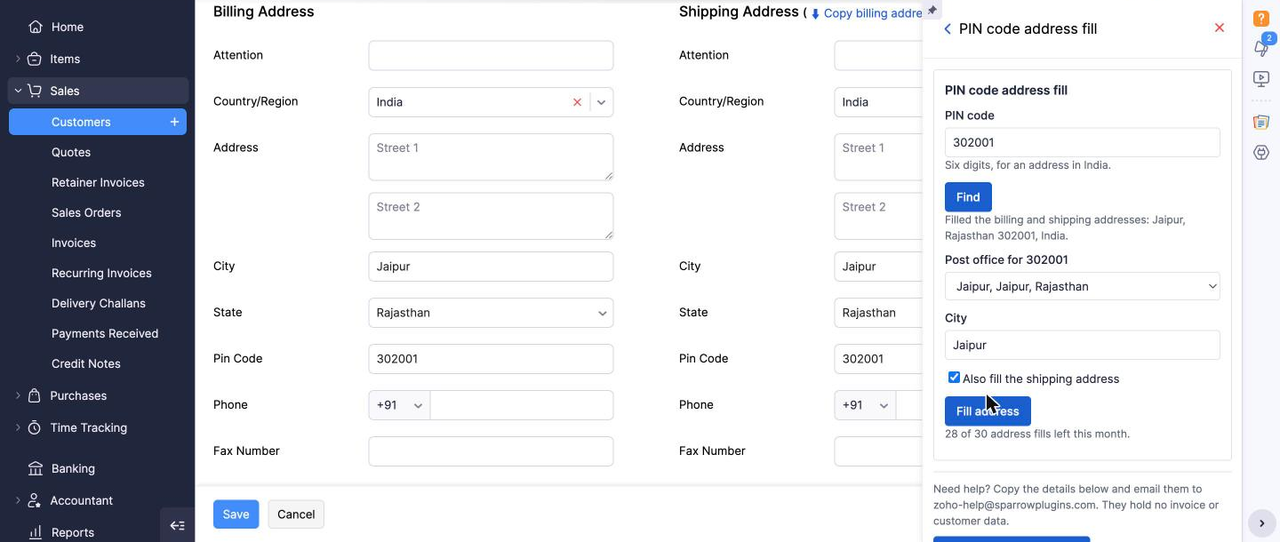
Type an Indian PIN code, pick the post office, and the city, state, PIN and country fill in on new customers and vendors.
Coming soon to the Zoho Marketplace
Typing addresses for new customers and vendors is slow, and a wrong state breaks the GST place of supply. Zoho Books does not fill the city or state from a PIN code.
Type the 6-digit PIN code in the side panel of a new customer or vendor. It lists the post offices for that PIN. Pick one, check the city and click Fill address. City, state, PIN code and country India go into the billing address, and one tick does the shipping address too. Your street lines stay as typed.
State names match the Books list. Old India Post spellings like Pondicherry are changed, and Leh and Kargil go under Ladakh.
PIN data comes from api.postalpincode.in, a free third-party service built on India Post's public post office list. No account or key is needed.
Not affiliated with Zoho Corporation.
What it does
- Type a 6-digit PIN code on a new customer or vendor and see its post offices
- Fills city, state, PIN code and country India in the billing address
- One tick fills the shipping address the same way
- State names match the Books list, including Ladakh and Dadra and Nagar Haveli and Daman and Diu
- A PIN typed into the form's own field is picked up by the panel
Set it up
- Install the extension from the Zoho Marketplace.
- When Books asks, authorise the connection named sparrowbooks with your Zoho Books login. It only keeps the monthly count and error log in a hidden global field.
- Open Sales > Customers > New (or Purchases > Vendors > New).
- Open the PIN code address fill panel from the right side bar.
- Type the PIN code and click Find. Pick the post office, check the city and click Fill address.
- Add the street lines and save as usual.
Plans and limits
Lite: 30 address fills a month per organisation. Looking up a PIN code is free; only a fill counts. Pro: unlimited, USD 8 a month after a 15-day free trial. Zoho Books Premium plan or higher is needed for widgets. Built for the India edition of Zoho Books, for addresses in India.
Privacy
The PIN code you type is sent to the third-party service api.postalpincode.in to find its post offices. Nothing else leaves Zoho: no names, emails or street addresses. The extension keeps only a monthly fill count and a short error log in a hidden global field in your own organisation.
Support
Email zoho-help@sparrowplugins.com. "Copy details for support" in the panel gives text to paste in; it holds no customer data. Maker: Sparrow Plugins, Udaipur, India.